

Most organisations choose collaboration platforms by comparing features. Then wonder why adoption fails.
Here’s what we’ve learned implementing these platforms across UK businesses: the organisations that succeed aren’t the ones who chose the “right” platform by feature comparison. They’re the ones who committed completely and forced the change.
Microsoft Teams reached 360 million monthly active users by June 2025. Slack surpassed 42 million daily active users in early 2025. On independent review platforms, Slack scores slightly higher – 4.5 out of 5 on G2 compared to Teams’ 4.3.
But those ratings won’t tell you which platform fits your organisation. This guide shows you how to choose based on operational fit, not feature counts – and how to implement whichever platform you choose so people actually use it.
Platform Strengths at a Glance

What Most Organisations Get Wrong

After helping organisations implement collaboration platforms, we’ve noticed something important: the organisations that succeed aren’t necessarily the ones who chose the “right” platform by feature comparison.
They’re the ones who committed completely.
Hotel groups choosing Teams shut down all WhatsApp coordination groups, archived old intranets, and made it clear that information outside Teams wouldn’t be official. Result: operational communication moves into searchable channels where new staff can find context.
Startups choosing Slack banned email attachments after go-live, required all client communication in channels, and forced tool notifications through Slack. Result: onboarding time drops because new hires find everything in channels instead of asking repeatedly.
The platform mattered less than the commitment to making one platform work.
This matters because organisations often focus on feature comparisons when they should focus on whether they’ll actually force the change. A slightly inferior platform with total commitment outperforms a superior platform with half-hearted adoption every time.
Before you compare features, ask yourself: will we actually shut down the WhatsApp groups? Ban email attachments after go-live? Archive the old intranet with hard dates? If not, don’t blame the platform when adoption fails.
Understanding Total Cost Beyond Licences
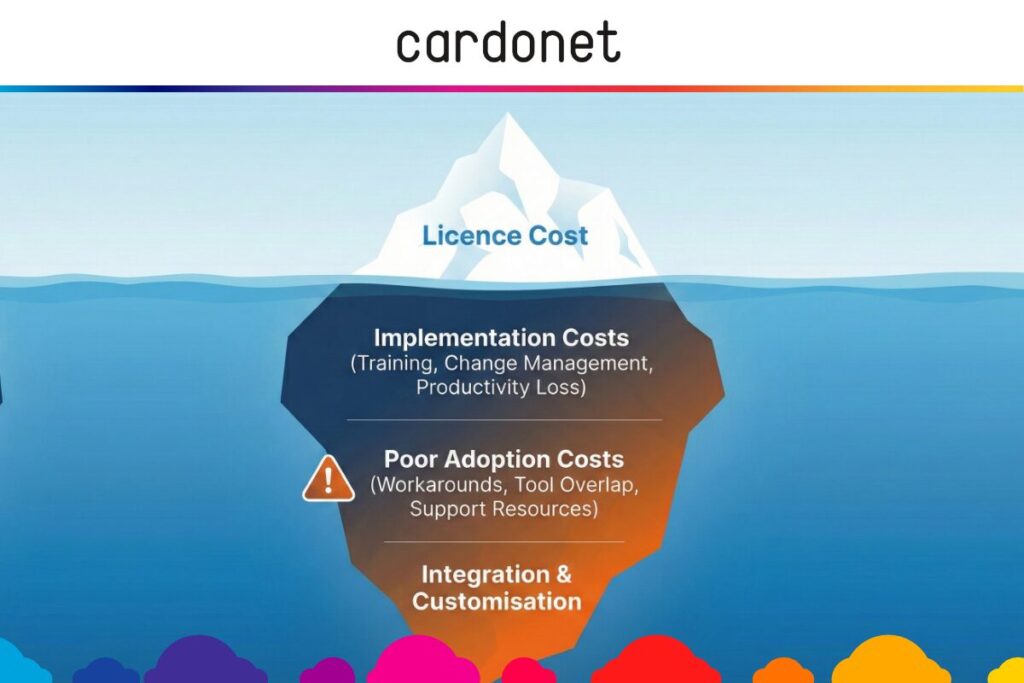
Don’t choose based on licence cost alone. We’ve seen organisations spend far more on workarounds and poor adoption than they saved on subscription fees.
Cost categories that matter:
Implementation costs:
- Training time
- Change management planning and execution
- Lost productivity during transition
- External consulting if internal expertise isn’t available
Ongoing costs:
- Tool overlap during
- Poor adoption costs (when staff continue using email and WhatsApp)
- Support and maintenance resources
- Integration setup and customisation
The least expensive licence isn’t always the best value. Factor in total implementation costs and adoption likelihood before deciding.
How Architecture Affects Daily Operations
Microsoft Teams architecture:
Teams exists as part of the Microsoft 365 ecosystem. This creates advantages when you already operate in Microsoft’s environment:
- Documents in SharePoint appear directly in Teams channels
- OneDrive files integrate without third-party connectors
- Microsoft Entra ID provides unified identity management
- Power Platform enables workflow automation across Microsoft applications
- Security policies apply uniformly across the ecosystem
For hotels managing multiple properties, this unity matters. Property managers editing operational procedures in SharePoint can discuss changes directly in Teams without switching applications. When systems need support, you manage one vendor relationship instead of coordinating between multiple providers.
Slack architecture:
Slack operates as an integration hub connecting diverse tools:
- Native connectors for Google Workspace, Salesforce, Jira, Asana, GitHub
- Workflow Builder for non-technical automation creation
- Custom app development for organisation-specific needs
- Platform-agnostic approach preserves tool diversity
- Integrations through APIs and webhooks
For startups using GitHub for development, Salesforce for sales, Jira for product management, and HubSpot for marketing, Slack connects them without forcing tool replacement. Engineering sees deployment notifications. Sales sees deal updates. Product sees sprint progress. All in one place.
Decision Path: Which Platform Fits?
Quick Decision Path:
Question 1: Is your organisation 80%+ standardised on Microsoft 365?
- YES → Strong Teams fit. Go to Question 2
- NO → Consider Slack. Go to Question 2
Question 2: Does work happen in scheduled meetings or continuous communication?
- Scheduled meetings with formal structure → Teams likely fits
- Continuous fast coordination → Slack likely fits
- If unclear → Go to Question 3
Question 3: Do you need integration with diverse tools (Salesforce, Jira, GitHub, Google Workspace)?
- YES → Slack’s ecosystem-agnostic approach fits better
- NO → Teams integration within Microsoft likely sufficient
Your likely fit based on answers:
- Mostly Teams indicators → Start with Teams pilot
- Mostly Slack indicators → Start with Slack pilot
- Mixed signals → Continue to Five Critical Questions below
Five Critical Questions for Unclear Situations
1. Where do documents live and how often do people use them?
If 80%+ of documents sit in SharePoint and people access them regularly – property managers editing procedures, operations reviewing checklists, HR accessing policies – Teams’ native integration delivers real value.
If documents scatter across Google Drive, Dropbox, and various cloud storage, Slack connects them without forcing migration.
But be honest: if nobody knows where documents live anyway, no collaboration platform will fix your information architecture problem.
2. How do teams communicate during operational pressure?
Restaurant kitchens during service need instant coordination. Kitchen manager needs to tell the bar about a table’s shellfish allergy and ask if they can push a seating back by 10 minutes. WhatsApp: immediate. Teams: open app, find channel, type, wait. When 180 covers are booked and tickets are flying, those extra seconds matter.
Hotel front desk during Saturday checkout needs to message housekeeping about a late departure, check with maintenance about a lift issue, and ask restaurant about a guest dietary requirement – all while processing checkouts. That coordination needs to be instant and mobile-first, not buried in threaded conversations three clicks deep.
Corporate environments with scheduled coordination rhythms benefit from Teams’ structured approach where meetings, documents, and conversations connect logically.
3. What are you actually willing to standardise?
This isn’t a technical question – it’s an organisational one. Are you willing to migrate Google Workspace users to Microsoft 365 for collaboration benefits? Are you willing to force sales off Salesforce integrations they rely on?
If the answer is “no, we deliberately maintain diverse tools,” choose the platform that accommodates that reality.
4. What behaviours define successful adoption 90 days after launch?
Don’t measure login counts. Define behavioural change:
- Staff check platform before shift start instead of asking colleagues
- Email attachment volume decreases by measurable percentage
- “Where’s that file?” questions reduce significantly
- Operational decisions captured in searchable channels
- New staff onboarding time decreases due to accessible information
Pick 3-5 specific metrics before choosing a platform. If you can’t define what success looks like, you can’t evaluate whether either platform delivers it.
5. What systems will you retire completely?
If nothing gets eliminated, the new platform becomes another ignored channel. Communication fragments across email, WhatsApp, the old system, and the new one.
Be brutally honest: Will you actually shut down WhatsApp groups? Will you ban email attachments after go-live? Will you archive the old intranet with hard dates? If not, adoption will fail regardless of which platform you choose.
Implementation Framework That Works

Step 1: Define 3-5 measurable outcomes before launch
- Reduce “where’s that file?” questions by specific percentage in defined timeframe
- Decrease email attachments by measurable amount
- Capture operational decisions in searchable channels
- Cut new staff onboarding time due to accessible context
Step 2: Eliminate competing channels with hard dates
- Archive internal forums and old collaboration tools
- Announce WhatsApp group closures with specific cutoff dates
- Declare information outside the platform won’t be considered official after launch
- Close alternatives to force commitment
Step 3: Train for job impact, not platform features
Focus training on daily workflow changes:
- Show property managers where updates go and why visibility matters
- Demonstrate how status updates eliminate repeated “what’s happening?” questions
- Train on notification protocols for operational coordination
- Use role-specific scenarios, not generic feature tours
Step 4: Appoint trusted champions, not technical experts
Select based on influence:
- Experienced staff others naturally ask for guidance
- People who understand operational reality and cultural dynamics
- Those who can give honest feedback about what’s working
- Run informal drop-in sessions for practical questions
Step 5: Review honestly at 30 and 90 days
Assess friction points:
- What behaviours stuck? What didn’t?
- Where are workarounds emerging?
- Which teams show resistance and why?
- What needs adjustment based on actual usage?
Make modifications based on operational reality, not original assumptions.
Why Implementations Fail
Assuming people will “figure it out”:
Organisations rolling out platforms with minimal training see continued WhatsApp coordination, email attachments, and informal workarounds months after launch. The platform doesn’t fail technically – the implementation fails culturally. Budget proper training or accept poor adoption.
The “different teams prefer different tools” trap:
We see this pattern repeatedly: account teams prefer Teams because they work with corporate clients who use Microsoft. Creative teams prefer Slack because it integrates with design tools. Leadership decides to “let teams choose what works for them.”
Result: Client meeting notes in Teams. Design feedback in Slack. Project decisions split between both. New staff spend their first week asking “where do I find…?” Nobody knows where anything lives. The fragmentation gets worse, not better.
Pick one. Force the commitment. Accept short-term friction to gain long-term clarity.
Choosing based on features instead of operational fit:
Feature matrices miss architectural assumptions. Teams assumes work happens in meeting-centric blocks. Slack assumes continuous asynchronous communication. Choosing based on feature counts rather than operational fit creates adoption problems features can’t solve.
Under-resourcing change management:
Treating implementation as IT deployment rather than cultural change guarantees poor adoption. Change management investment should be proportional to cultural shift required. “It’s just software” thinking produces failed implementations regardless of platform quality.
Security Considerations
Both platforms meet enterprise security standards when properly configured. Choose based on which integrates better with your existing identity management, not which has more security badges.
Microsoft Teams: Enterprise-grade infrastructure, Microsoft Defender integration, data residency options, unified security policies across Microsoft 365 ecosystem.
Slack: Enterprise Key Management on Enterprise Grid, Data Loss Prevention on Business+ and Enterprise plans, SOC 2 and ISO 27001 certifications, GDPR compliance with EU data residency.
Hotels and hospitality businesses working with payment card data should verify both platforms support PCI-DSS compliance within your specific implementation.
AI Features: Choose for Today, Not Tomorrow
Both platforms are developing AI capabilities rapidly. Microsoft Copilot integrates across 365 applications. Slack AI focuses on collaboration-specific intelligence.
Don’t choose based on current AI features – they’re evolving constantly. Choose based on architectural fit today. The platform that matches your ecosystem and culture now will benefit most from AI enhancements as they develop.
Getting Implementation Support
Choosing the right collaboration platform requires understanding your technology ecosystem, communication patterns, and operational requirements – not just comparing feature lists.
Cardonet works with organisations to:
- Assess technology landscapes and communication patterns
- Pilot both platforms with teams doing real operational work
- Implement chosen solutions with proper change management
- Provide role-specific training focused on behavioural outcomes
- Optimise based on actual usage patterns
Our IT strategy services take a platform-agnostic approach focused on what genuinely works for your organisation.
Ready to make an informed decision? Contact Cardonet for an assessment tailored to your operational needs. Call us on 020 7501 0578 or reach out online today.
FAQs: Microsoft Teams vs Slack
Can we switch platforms if we make the wrong choice?
Yes, but expect 3-6 months for complete migration and significant costs including data transfer, retraining, and workflow reconfiguration. Treat your initial choice as a long-term commitment.
Should we run both platforms simultaneously?
No, except during time-limited transitions. Running dual platforms fragments communication and creates silos. Pick one, commit organisation-wide, and resource its implementation properly.
How much training time should we budget?
Research indicates 2-4 hours per person for basic proficiency, plus 2-3 weeks of daily use with champion support. Treat adoption as continuous process with ongoing coaching.
What are the key security differences?
Both platforms meet enterprise security standards when properly configured. Choose based on how security integrates with your existing identity and governance frameworks, not badge counts.
How will AI affect this decision?
AI capabilities evolve rapidly on both platforms. The platform that fits your current ecosystem and culture will benefit most from future AI enhancements. Don’t choose based solely on current AI features.
What’s a realistic adoption timeline?
With proper implementation, expect 50-60% of regular communication happening in the platform within 30 days, and 75-85% by 90 days. “Regular communication” means operational updates, decisions, and file sharing – not just logins. Without adequate change management, adoption often plateaus at 30-40% with workarounds becoming permanent.
How do we handle team resistance?
Understand why resistance exists. Teams resisting transparency may have legitimate concerns about information control. Teams resisting structure may work in high-tempo environments incompatible with meeting-centric workflows. Address underlying mismatches rather than mandating compliance.
What if we use both Microsoft and Google tools?
You’ll need to decide which ecosystem to standardise around or accept a platform as neutral integration hub. Running Microsoft 365 for some functions and Google Workspace for others creates complexity. Most organisations benefit from choosing one productivity suite.


You must be logged in to post a comment.