
Your hotel is fully booked this weekend – and by Saturday morning, you could have three one-star reviews because your WiFi sucks.
Don’t blame your provider. Hotel WiFi failures are almost never caused by slow broadband. Rather, blame your design team – failures are usually the result of a network infrastructure that wasn’t designed to handle 150 simultaneous guests streaming, working, and video calling at the same time.
What makes things worse is that the same infrastructure problem driving those guest complaints is also slowing down your front desk – because the guest network and your PMS are running on the same overloaded system. You’re losing on both ends at once.
More bandwidth won’t fix a poorly architected network. And while you’re waiting for the next contract renewal to upgrade, guests are writing the reviews that are pushing your next corporate booking to a competitor.
Research consistently shows WiFi sitting at or near the top of every guest priority survey – above parking, above breakfast, and, in some studies, above the bed itself. It’s a hygiene issue: unremarkable when it works and a disaster when it doesn’t.
Why Hotel WiFi Keeps Failing
Most hotels approach WiFi as a single purchase: buy broadband and install access points. The problem is that hotels are among the most demanding WiFi environments on the planet.
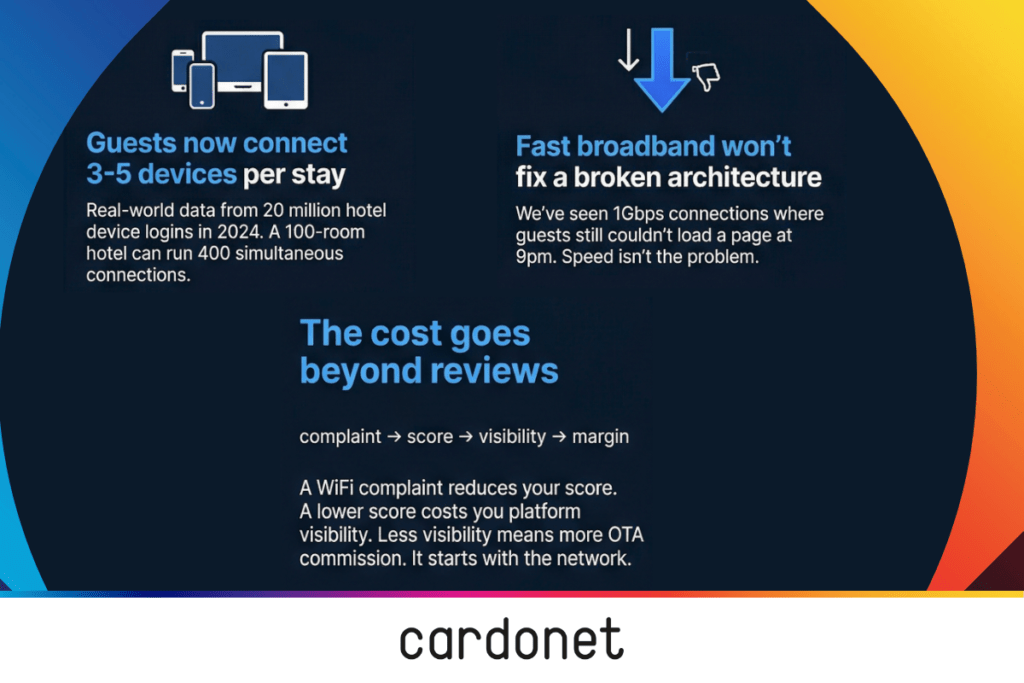
Analysis of over 20 million device logins on managed hotel networks in 2024 found that the average guest now connects between three and five devices during their stay. A 100-room hotel at full occupancy can easily be running 400 or more simultaneous connections.
The failure points we find when we audit a hotel network are almost always the same four things.
- The access points are in the wrong place – corridors and server rooms instead of guest rooms
- Guest traffic is sharing a pipe with the PMS and back-of-house systems
- Nobody set up Quality of Service rules, so background downloads compete with real-time video calls and win at the worst moments
- There’s no network monitoring in place, so problems surface when guests complain rather than when the team spots them.
These aren’t hardware problems. They’re design and configuration problems – and buying better equipment without fixing design produces exactly the same result.
How Poor WiFi Destroys Review Scores
Think about how that Friday night arrival plays out. A guest checks in, gets to their room, connects to the WiFi, and tries to decompress with Netflix. The stream buffers. They switch to their phone’s mobile data. They feel like they’ve been undersold.
By the time 9pm arrives, the majority of your guests are online simultaneously. The network slows to a crawl… a business traveller trying to send a client email can’t connect, a couple on a city break who paid for a superior room are watching their smart TV attempt to load the same opening frame for thirty seconds. If they don’t call the front desk, taking up valuable time, they would well just write the negative review and be done with it.
There is a measurable correlation between WiFi quality and Booking.com scores – properties with better-managed networks consistently rated higher overall. On the major booking platforms, a lower score costs you visibility – and visibility costs you bookings. That effect builds.
The Five-Part WiFi Fix
There’s no single fix. A reliable hotel network requires five things working together. When one is missing, the others don’t compensate.
1. Network design (not just hardware)
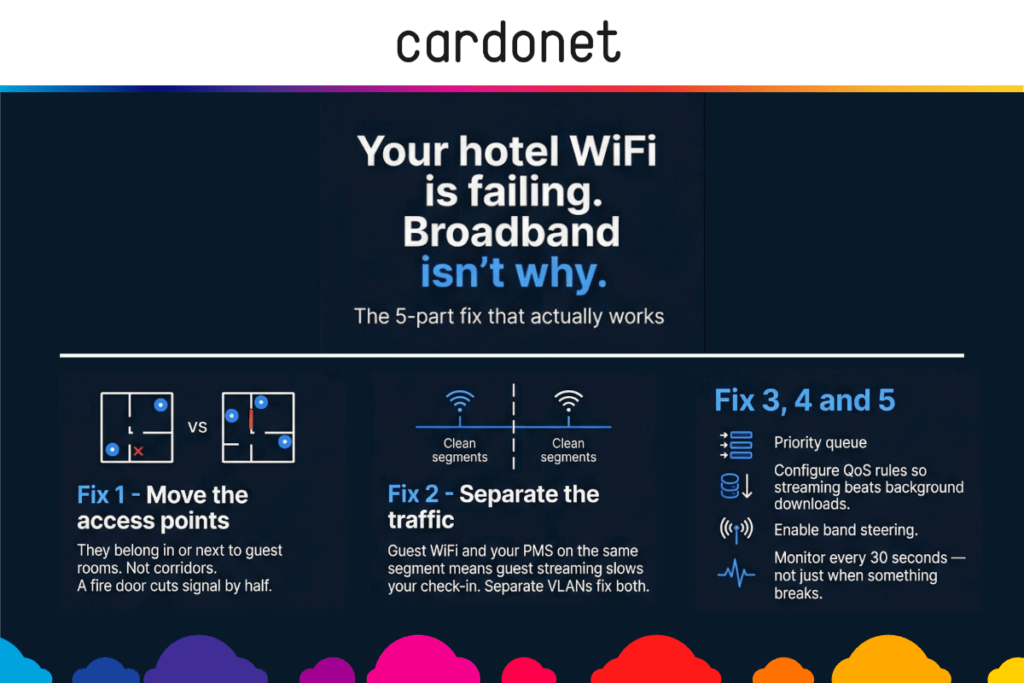
Hotels that keep buying new access points and still get complaints almost always have the same problem: the access points are in the wrong place, including corridors, server rooms, and reception areas. Guests who are three metres from an access point through a fire door will get a fraction of the signal a guest in the adjacent room receives. Access points need to be positioned in or adjacent to guest rooms, with small, controlled cell sizes and deliberate overlap planning. Design before procurement.
2. Traffic segmentation.
When your guest WiFi and your PMS share the same network segment, peak demand at 9pm on a Friday impacts your check-in system and front desks grind to a halt because the majority of guests are streaming simultaneously, not because the internet was down. Guest WiFi, staff devices, the PMS, POS terminals, CCTV, and smart room controls need to sit on separate VLANs.
The NCSC’s guidance on network segmentation is explicit: limiting connections between systems reduces the attack surface and contains the impact of any failure. In a hotel that means isolating guest devices from operational systems. Mixing them creates both a performance problem and a security exposure. If a guest can theoretically reach your PMS from their room, your segmentation needs immediate attention. That’s not a theoretical risk, it’s an active one.
3. Quality of Service (QoS) rules.
Many hotel networks have no QoS policy at all – it simply wasn’t configured when the system was originally installed. Without it, one guest downloading a system update at peak time can degrade video call quality for an entire floor. Real-time traffic (voice calls, video conferencing, and streaming) needs to be prioritised over background traffic. This isn’t a hardware upgrade. It’s a configuration decision that costs nothing to implement and makes an immediate difference to how the network feels under load.
4. Load balancing and band steering.
Older devices gravitate to the 2.4 GHz band by default. When enough of them do it simultaneously, they drag performance down for every device on that frequency – including newer ones that could be running on 5 GHz. We see this consistently on hotel networks where band steering was never enabled: the newer access points are being held back by devices that haven’t been pointed to the right frequency. Band steering automatically pushes capable devices where they should be.
5. 24/7 monitoring.
The hotels that stop getting WiFi complaints aren’t the ones with the fastest internet. They’re the ones where someone is watching the network and realizing there is a problem before the guests start noticing. We monitor response times regularly. When performance drops, we investigate before the front desk receives a complaint. Most WiFi problems are detectable before they affect guests – but only if you’re actually keeping an eye on them and have the right alerts set up. Our hotel WiFi support is built around exactly this kind of proactive oversight.
How to Implement Improvements Without Disruption
The instinct when WiFi is failing is to act fast – replace the access points, upgrade the contract, and reboot everything. In our experience, that urgency usually makes things worse. Rushed changes to a live hotel network can introduce new problems, and they tend to surface at the worst possible moments.
A phased approach works better. Here’s a good sequence:
- Audit first. Survey the existing network before touching anything. Map access point placement, identify coverage gaps, check VLAN configuration, test performance under load. You need to understand the specific problem before you can fix it – not apply a generic upgrade.
- Design the target state. Once you know what’s broken, design around those specific points. Don’t go for a generic upgrade but for a targeted fix covering access point placement, segmentation architecture, QoS policy, and monitoring.
- Schedule changes during low-occupancy windows. Network changes should happen midweek, during quiet periods and not the night before a fully booked weekend. Plan change windows in advance and brief your front desk team so they can manage guest expectations if anything needs a brief reset.
- Test under load before go-live. Simulate peak demand before a full rollout. Push multiple simultaneous connections through the new architecture to confirm that performance holds under realistic conditions.
- Hand over monitoring, not just hardware. Once the infrastructure is correct, ongoing monitoring will keep it that way. Cardonet’s hotel internet connectivity service includes continuous network performance monitoring so issues are caught and resolved before guests notice them.
The most common objection we hear is cost. The honest answer is that a properly designed network costs more to build than a bodged one. But when you take into account the compounding cost of poor reviews, lost repeat bookings, and an emergency rebuild when the network finally fails on a peak weekend it’s pennies in the pound.
What a Reliable Hotel Network Looks Like
Most hotel GMs will assume their WiFi is fine until they look at their reviews. Then they see the consistent mentions of slow connections, failed logins, and dropped calls that have been quietly pulling their score down. The checklist below isn’t a wishlist. It’s a diagnostic. If you can’t confirm every item, you have a specific problem to fix, not a vague WiFi issue to manage.
Hotel Network Health Checklist
- Access points are positioned in or adjacent to guest rooms – not in corridors
- Guest, PMS, POS, and IoT traffic are on separate VLANs
- QoS rules are active and prioritising real-time traffic
- Band steering is directing devices to the correct frequency automatically
- Network performance is monitored 24/7, not checked only when faults are reported
A hotel that can confirm all five should not be getting WiFi complaints. More importantly, it shouldn’t be losing the five-star reviews it earned on everything else.
Cardonet’s hotel IT support team works with hotels across London and the UK to design, deploy, and monitor networks that hold up at full occupancy and not just during the survey visit.
The Cost Keeps Compounding
The financial chain runs longer than most GMs realise. WiFi complaints will reduce your overall score which will reduce visibility on booking platforms, resulting in more reliance on traditional, expensive channels. The WiFi problem that looked like a guest satisfaction issue reduces your margins.
Repeat bookings are the highest-margin revenue a hotel generates. Guests, especially corporate ones, who have a poor connectivity experience just don’t come back. This won’t appear on incident reports but will do so – invisibly – in occupancy trends months later.
The operational cost follows the same logic. PMS slowdowns during peak check-in, payment processing delays at busy periods, housekeeping sync failures on high-turnover days are often logged as separate incidents by separate teams when they’re usually the same root cause: a network that wasn’t designed to carry the load it’s being asked to carry. Fix the network, and several problems that looked unrelated disappear at once.
None of this requires exotic technology or a full infrastructure replacement. Most of it is standard network design applied properly. In our experience, the majority of hotels don’t need new hardware at all. They need their existing setup configured correctly and someone watching it around the clock.
Next Steps
- Run a network audit. Before spending on new hardware, understand what your current network is actually doing. A proper audit will identify whether your problem is design, hardware, configuration, or capacity and how to address them.
- Check your segmentation. If your guest WiFi and PMS are on the same network segment, fix that first. It’s the single change that most often produces the biggest immediate improvement in both performance and security posture.
- Fix before peak season. If you have a busy summer period, the time to put monitoring in place is now and not the Monday after a bad weekend.
If you want to know exactly what’s happening on your hotel network before peak season, a managed WiFi assessment is the right starting point – here’s what ours covers.
Pratik Patel is Director of Operations at Cardonet, where he leads service delivery and network infrastructure projects for hotels and hospitality businesses across London and the UK. With a background as a network support engineer, Pratik has designed, audited, and rebuilt hotel networks of every size. He has spent the last decade fixing the problems that broadband upgrades never resolve.
FAQs: Hotel WiFi
Why is hotel WiFi slow even when the broadband speed is fast?
Broadband speed is only one part of the picture. The more common causes of slow hotel WiFi are poor access point placement, missing traffic segmentation, no Quality of Service rules, and wired infrastructure that can’t handle current device density. Upgrading your broadband contract without addressing these won’t improve the guest experience.
How many devices should my hotel network be designed to support?
The average guest now connects between three and five devices during their stay. At full occupancy in a 100-room hotel, that means designing for 400 or more simultaneous connections. Hotels with meeting and event facilities need to plan for significantly higher demand during conference periods.
Do I need separate networks for guests and staff?
Yes. Guest WiFi, staff devices, the PMS, POS terminals, CCTV, and IoT devices should all sit on separate VLANs. Mixing these creates both a security vulnerability and a performance problem. If a guest can theoretically reach your PMS network from their room, your segmentation needs immediate attention.
How often should hotel WiFi infrastructure be reviewed?
At minimum, annually – and immediately before any significant increase in capacity, such as adding guest rooms or taking on event space. Network performance should be monitored continuously, with a structured review of design and hardware every 12 to 18 months.
Can poor WiFi really affect our Booking.com and Google scores?
Yes. There is a clear, measurable correlation between WiFi quality and Booking.com scores. Properties with better-managed networks consistently rated higher overall, with the effect most pronounced on top-end ratings. A lower WiFi score pulls down your overall rating, which affects platform visibility and booking conversion.


You must be logged in to post a comment.